 cinemasetfree.com
Script Actions
Every script row carries action buttons — Load in Editor, New Revision, Redo Import, Undo Import, and Delete (or Restore on deleted rows). Switch on Select mode to delete several scripts at once, or start fresh with New Blank.
Starting a Blank Script
Not every script has to come from a file. The New Blank button at the top of the tab creates an empty "Untitled Script" and drops you straight into the editor to write it yourself — handy for notes, treatments, or drafting from scratch.
Per-Script Actions
Each active script row has a row of action buttons on the right. On narrow screens these collapse into an Actions dropdown. Here's what each one does:
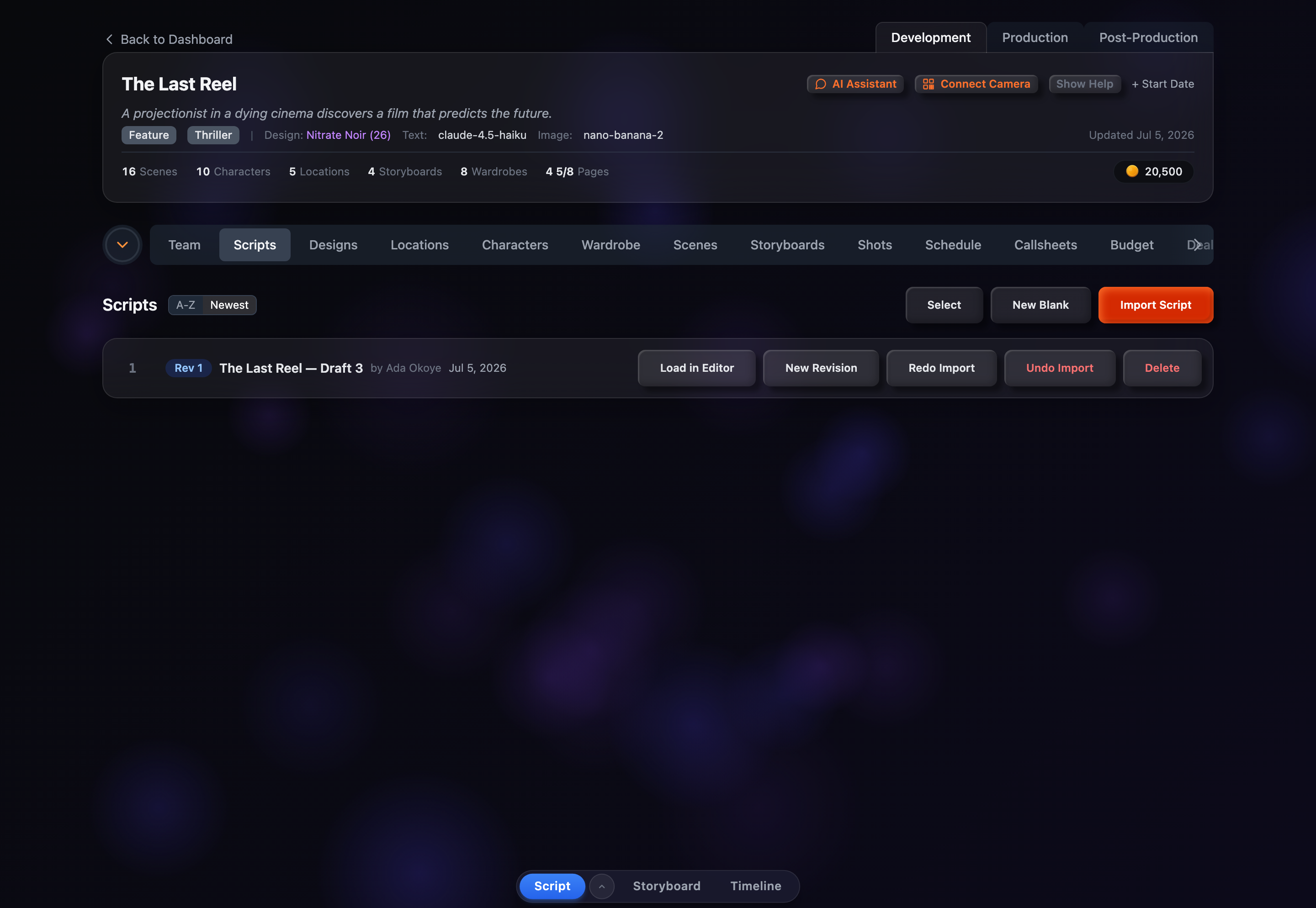
Load in Editor
Opens the script in CSF's built-in Fountain editor, where you can read, edit, and navigate the screenplay. This is also where a New Blank script lands.
New Revision
Creates a copy of the script with a bumped revision number, linked back to the original via parentScriptId, so you can keep a history of drafts. The new revision appears as its own row in the list.
Redo Import
Re-runs the import against the script's stored Fountain text in place — the button shows a spinner while it works and refreshes the scenes, characters, and locations without reopening the review screen. Use it after editing a script to pull the extracted data back in sync.
Undo Import
Deletes the scenes, characters, and locations that this import created, while leaving anything that existed beforehand untouched. A confirmation modal spells this out first. The script row itself stays put — only its imported entities are removed — so it's the right tool when the parse pulled in the wrong data or you want to start the import over.
Delete
Soft-deletes the script after a confirmation prompt. Deleted scripts drop out of the default list but can be recovered later — the confirmation reminds you it can be restored.
Restore
Returns a soft-deleted script to the active list. This button replaces the others on deleted rows, and is only visible while Show Deleted is on.
Bulk Operations
To act on several scripts at once, click Select (or the number on any row) to enter selection mode. Every row gains a checkbox and a sticky action bar appears at the top of the list:
Select All / Deselect
One button that checks every script in the current filtered view, then flips to Deselect once they're all selected.
Invert
Flips the current selection — checked rows become unchecked and vice versa. Handy when you want to keep a few scripts and act on the rest.
Delete (N)
Soft-deletes every selected script at once. The button shows the live count and stays disabled until at least one row is checked; a confirmation modal appears before anything is removed.
Click Cancel to leave selection mode. Deletion is the only bulk action, and like single deletes it's reversible from the Show Deleted view.