 cinemasetfree.com
Schedule Integration
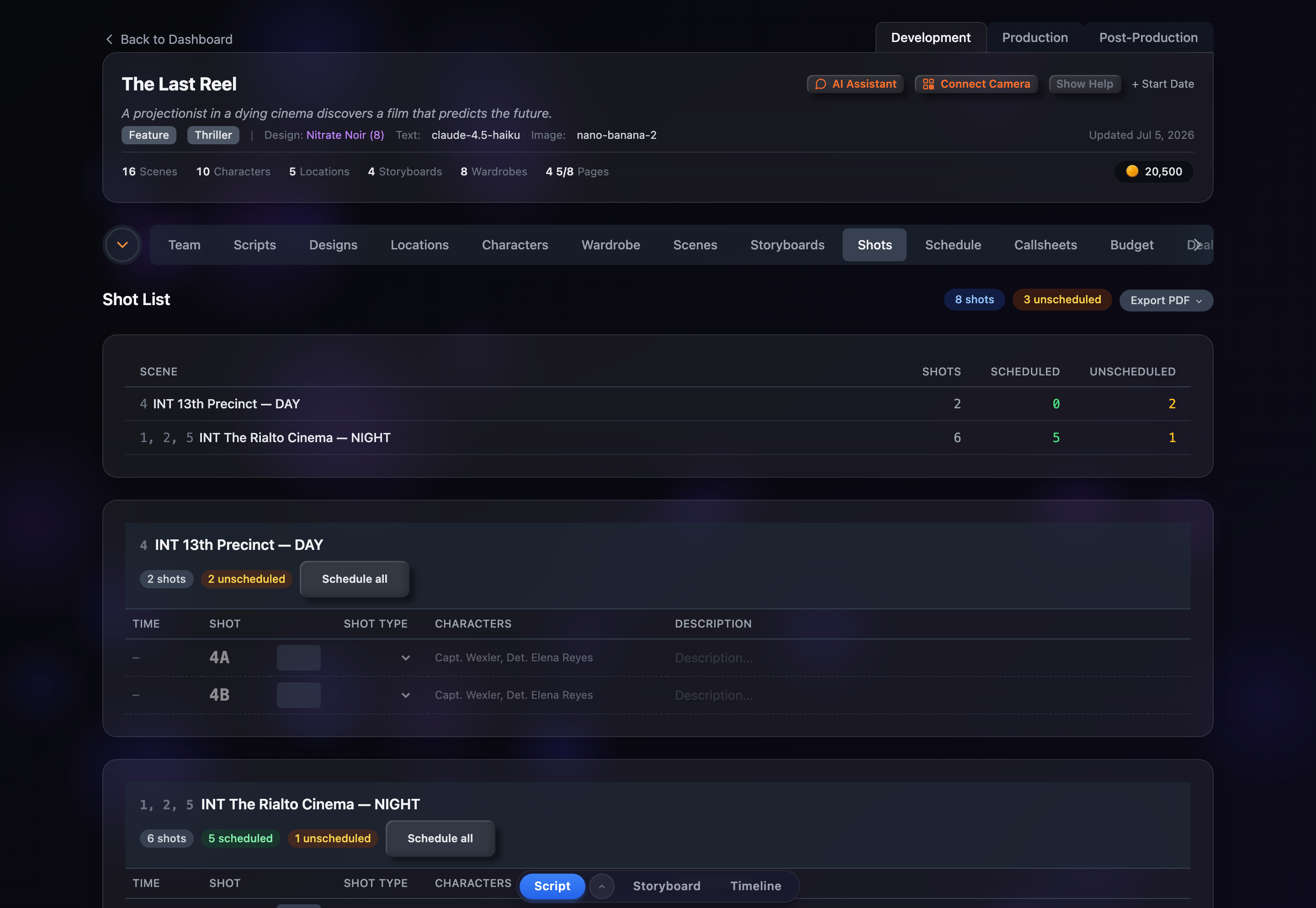
TL;DR — Scheduled shots show an estimated start time from your shoot day; unscheduled ones show a dash. Use “Schedule all” on a location to add its scenes to the shoot.
Estimated Times
The Time column shows each shot’s estimated start time once its scene is on a shoot day. Times are computed from the shoot day’s start time and each scene’s length, then spread across that scene’s shots. They’re shown in a compact 12-hour format — for example, “10:00a” or “2:45p.”
Timeline Events
Estimated times account for the rhythm of a real shoot day. A company move between locations adds about 30 minutes of travel, and a 60-minute lunch is inserted automatically once roughly four hours of work have elapsed. Everything after those events shifts later to match.
Unscheduled Shots
Shots whose scene hasn’t been placed on a shoot day appear as faded “ghost” rows with a dashed border and a dash instead of a time. Hovering brings them back to full strength. They’re still fully usable — you can set the shot type, edit the description, and reorder them before the scene is ever scheduled.
Scheduling From the Shot List
You don’t have to leave this tab to schedule. When a location still has unscheduled shots, a Schedule all button sits next to its amber pill — click it to add that location’s scenes to your last shoot day (you’ll be prompted to create a shoot day first if there aren’t any). Once everything in a location is scheduled, the button becomes Unschedule all so you can pull it back off the schedule.
Reading the Counts
Scheduled and unscheduled shots are counted everywhere so you always know what’s left. The page header carries a total shot badge plus an amber unscheduled badge; the summary table breaks the counts down per location in green and amber; and each location card repeats them as pills in its header. Watch the amber numbers drop to zero as you fill out the schedule.